API接口文档生成工具 - Swagger2

1. 引言

Swagger介绍

是一套功能强大但易于使用的API开发人员工具,适用于团队和个人,支持跨整个API生命周期的开发,从设计和文档,到测试和部署,提供开源,免费和商业三种模式,是一个整套的生态。

Swagger2介绍

其实是对springfox-swagger2的一个简称,是我们现在通常使用到的最多,其实它的实现也只是Swagger生态的一部分。

2. 应用场景

1. 前后台分离

2.实现模拟访问接口

3. 实现模式

应用Swagger2主要有下面2种方式

第一种模式

类似于现在目前的状况,先由后端编写接口文档与前端交流,但现在是以写swagger.json,然后生成服务端的代码(或者自己按照json手写代码)。
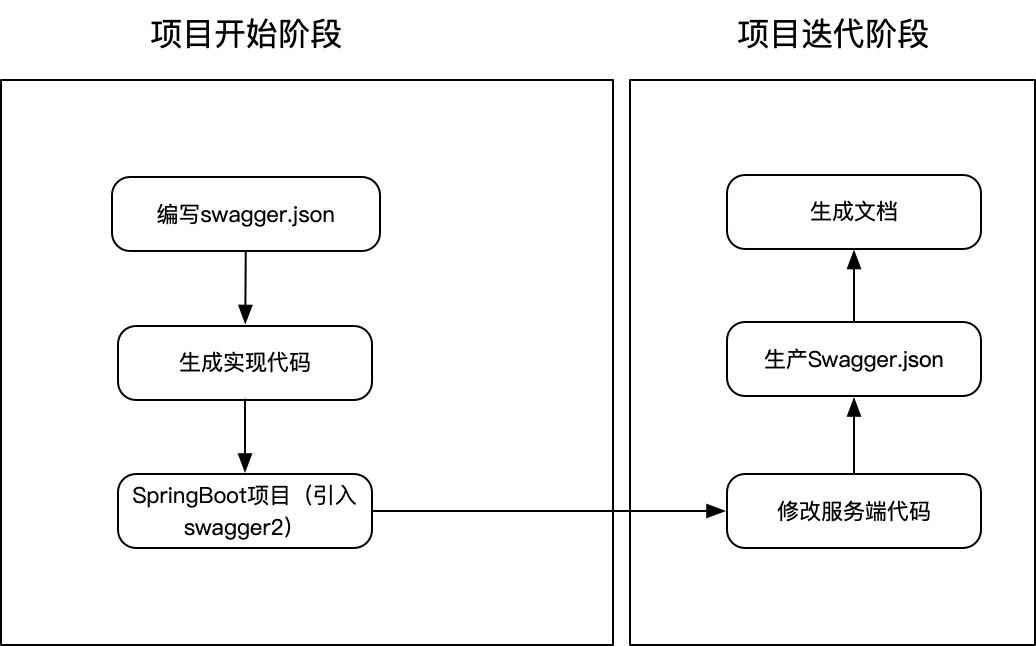
第二张模式

先编写实体类和control代码,并以注释的形式编写api,然后生产接口文档。
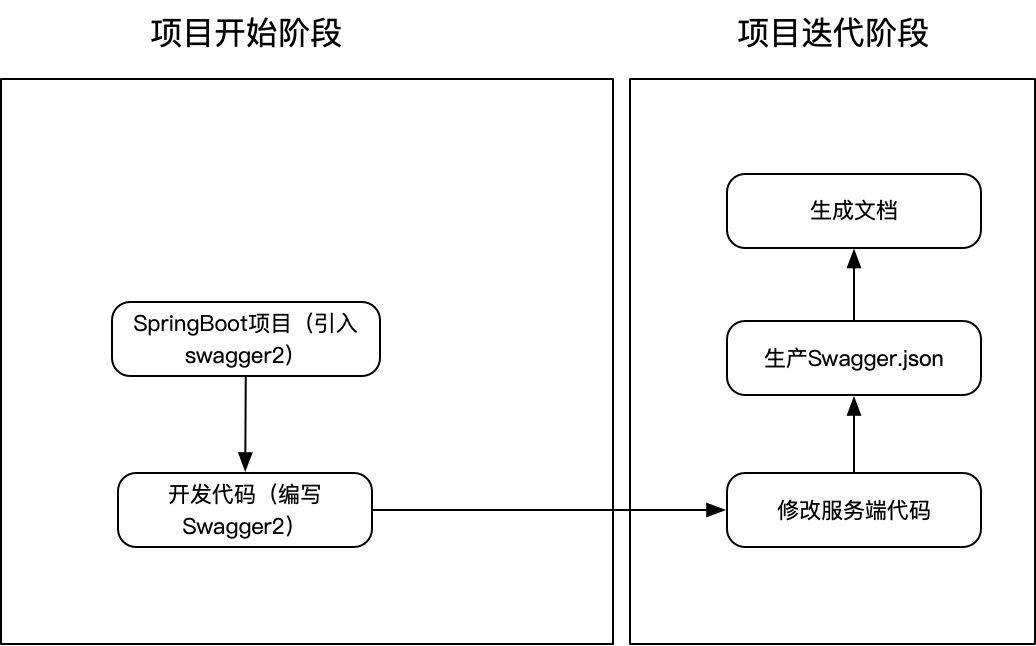
两种方式中第二种相对灵活,需要开发人员在进行代码开发的时候引入注释API,进而节约一部分时间,同时相对于生成代码更加灵活。

4. 文档与Mock

使用Swagger2的主要目的是接口信息前后端实时同步、文档的自动生成和Mock 的引入,这样有利于避免由于前后端信息不同步而产生的额外工作量,而且Mock的实现可以使前端可以无需依赖后端进行开发,减少联调时间,提高工作效率,缩短项目周期。

由于目前Swagger原生的组件不是特别友好,所以目前主流的方式就是 swagger2 + 第三方开源工具(可导出文档和实现mock功能)

目前主要应用的两个第三方开源如下:

1. YApi —— 由去哪儿网开源,功能完备,目前还算活跃。https://hellosean1025.github.io/yapi/index.html

2. swagger-bootstrap-ui —— 市面上比较流行,简洁。 https://github.com/liukaixiong/Swagger-Bootstrap-UI

上边2个具体使用方式就不具体说了网上一大堆,如果有需要可以整理一下哈😄。

5. 使用Swagger2

1. pom.xml中引入包

1
2
3
4
5
6
7
8
9
10
11
12
13
14
15
16
17
18
19
20
<!-- springfox-swagger2 用于JSON API文档的生成 -->
<dependency>
<groupId>io.springfox</groupId>
<artifactId>springfox-swagger2</artifactId>
<version>2.9.2</version>
</dependency>

<!-- springfox-swagger-ui 用于文档界面展示 -->
<dependency>
<groupId>io.springfox</groupId>
<artifactId>springfox-swagger-ui</artifactId>
<version>2.9.2</version>
</dependency>

<!-- 导出文档点jar,如果后端接第三方开源API管理系统可不添加 -->
<dependency>
<groupId>io.github.swagger2markup</groupId>
<artifactId>swagger2markup</artifactId>
<version>1.3.3</version>
</dependency>

2. 添加配置类

1
2
3
4
5
6
7
8
9
10
11
12
13
14
15
16
17
18
19
20
21
22
23
24
25
26
27
28
29
30
31
32
33
34
35
36
37
38
import org.springframework.context.annotation.Bean;
import org.springframework.context.annotation.Configuration;
import org.springframework.http.ResponseEntity;
import springfox.documentation.builders.ApiInfoBuilder;
import springfox.documentation.builders.PathSelectors;
import springfox.documentation.builders.RequestHandlerSelectors;
import springfox.documentation.service.ApiInfo;
import springfox.documentation.service.Contact;
import springfox.documentation.spi.DocumentationType;
import springfox.documentation.spring.web.plugins.Docket;
import springfox.documentation.swagger2.annotations.EnableSwagger2;

@Configuration
@EnableSwagger2
// 生产环境需要屏蔽Swagger 设置 false
@ConditionalOnExpression("${swagger.enable:true}")
public class Swagger2Config {

@Bean
public Docket createRestApi() {
return new Docket(DocumentationType.SWAGGER_2)
.genericModelSubstitutes(ResponseEntity.class)
.useDefaultResponseMessages(false)
.apiInfo(apiInfo())
.select()
.apis(RequestHandlerSelectors.basePackage("com.xxx.xxx.controller"))
.paths(PathSelectors.any())
.build();
}

private ApiInfo apiInfo() {
return new ApiInfoBuilder().title("swagger")
.description("Swagger API")
.contact(new Contact("username", "http://www.baidu.com", "username@mail.com"))
.version("1.0.0")
.build();
}
}

3. Control和model

1
2
3
4
5
6
7
8
9
10
11
12
13
14
15
16
17
18
19
20
21
22
23
24
25
26
27
28
29
import io.swagger.annotations.Api;
import io.swagger.annotations.ApiImplicitParam;
import io.swagger.annotations.ApiOperation;
import org.springframework.web.bind.annotation.RequestMapping;
import org.springframework.web.bind.annotation.RequestMethod;
import org.springframework.web.bind.annotation.RestController;

/**
* Created by Daniel on 2020/3/12.
*/
@RestController
@RequestMapping("/test")
@Api(tags = "测试")
public class TestController {

@ApiOperation(value = "打招呼", notes = "测试方法")
@ApiImplicitParam(name = "name", value = "姓名")
@RequestMapping(value = "/sayhi", method = RequestMethod.POST)
public String sayHi(String name) {
return "Hello," + name;
}

@ApiOperation(value = "获取所有用户", notes = "查询分页数据")
@RequestMapping(value = "/getall", method = RequestMethod.POST)
public User getAll() {
return new User();
}

}
1
2
3
4
5
6
7
8
9
10
11
12
13
14
15
16
17
import io.swagger.annotations.ApiModel;
import io.swagger.annotations.ApiModelProperty;
import lombok.Data;

/**
* Created by Daniel on 2020/3/12.
*/
@ApiModel(value = "com.zhitu.tboss.controller.User", description = "User返回结果结构")
@Data
public class User {

@ApiModelProperty(value = "用户名称")
private String name;
@ApiModelProperty(value = "年龄")
private Integer age;

}

4. 启动服务

输入:http://ip:port/swagger-ui.html
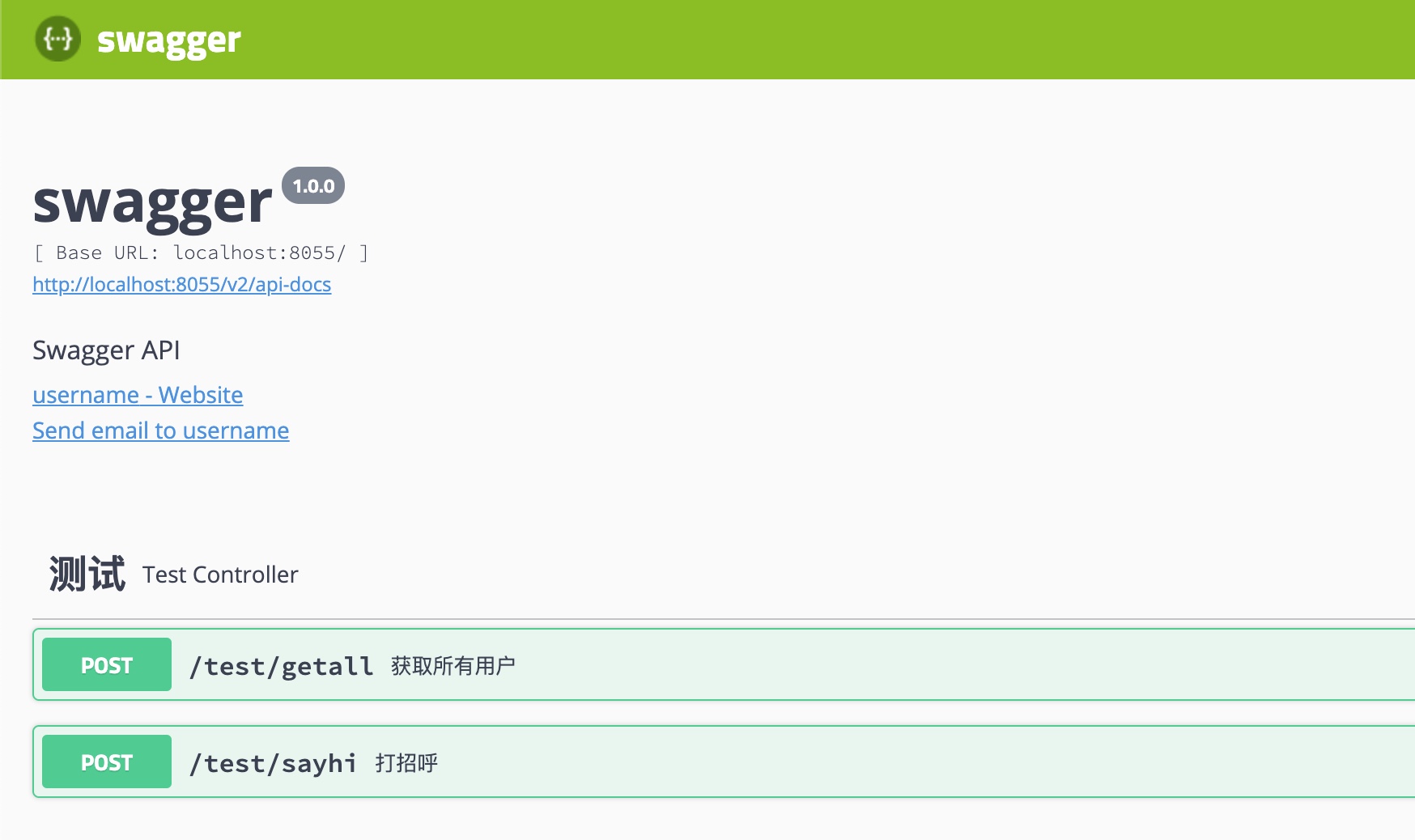
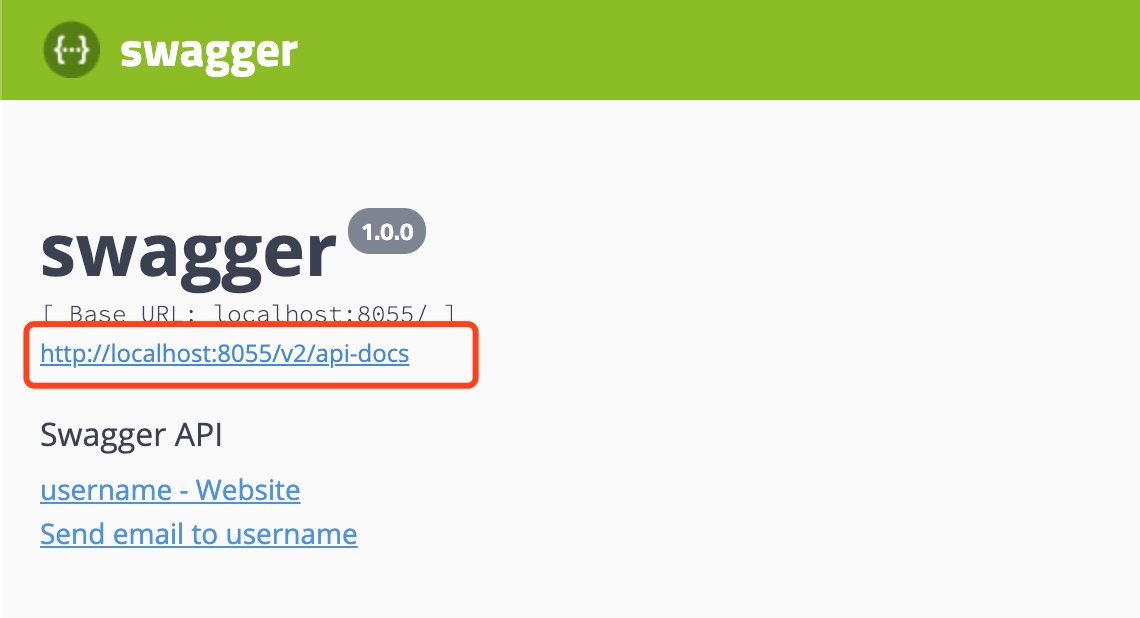
5. 查看swagger.json
6. 常用API注释

作用范围 API 使用位置
对象属性 @ApiModelProperty 用在出入参数对象的字段上
协议集描述 @Api 用于controller类上
协议描述 @ApiOperation 用在controller的方法上
Response集 @ApiResponses 用在controller的方法上
Response @ApiResponse 用在 @ApiResponses里边
非对象参数集 @ApiImplicitParams 用在controller的方法上
非对象参数描述 @ApiImplicitParam 用在 @ApiImplicitParams的方法里边
描述返回对象的意义 @ApiModel 用在返回对象类上

@Api:

tags=”说明该类的作用”

value=”该参数没什么意义,所以不需要配置”

1
2
@Api(tags = "测试")
public class TestController {}

@ApiOperation:

value=”说明方法的作用”

notes=”方法的备注说明”

1
2
3
4
5
@ApiOperation(value = "打招呼", notes = "测试方法")
@RequestMapping(value = "/sayhi", method = RequestMethod.POST)
public String sayHi(String name) {
return "Hello," + name;
}

@ApiImplicitParams:

@ApiImplicitParam:用在 @ApiImplicitParams 注解中,指定一个请求参数的配置信息

name:参数名

value:参数的汉字说明、解释

required:参数是否必须传

paramType:参数放在哪个地方

· header –> 请求参数的获取:@RequestHeader

· query –> 请求参数的获取:@RequestParam

· path(用于restful接口)–> 请求参数的获取:@PathVariable

· body(不常用)

· form(不常用)

dataType:参数类型,默认String,其它值dataType=”Integer”

defaultValue:参数的默认值

1
2
3
4
5
6
7
8
@ApiImplicitParams({
@ApiImplicitParam(name="mobile",value="手机号",required=true,paramType="form"),
@ApiImplicitParam(name="password",value="密码",required=true,paramType="form"),
@ApiImplicitParam(name="age",value="年龄",required=true,paramType="form",dataType="Integer")
})
public String sayHi(String name) {
return "Hello," + name;
}

@ApiResponses:

@ApiResponse:用在@ApiResponses中,一般用于表达一个错误的响应信息

code:数字,例如400

message:信息,例如”请求参数没填好”

response:抛出异常的类

1
2
3
4
5
6
7
8
@ApiOperation(value = "select1请求",notes = "多个参数,多种的查询参数类型")
@ApiResponses({
@ApiResponse(code=400,message="请求参数没填好"),
@ApiResponse(code=404,message="请求路径没有或页面跳转路径不对")
})
public String sayHi(String name) {
return "Hello," + name;
}

@ApiModel:

(这种一般用在post创建的时候,使用@RequestBody这样的场景,

请求参数无法使用@ApiImplicitParam注解进行描述的时候)

@ApiModelProperty:用在属性上,描述响应类的属性

1
2
3
4
5
6
7
8
9
@ApiModel(value = "com.xxx.xxx.User", description = "User返回结果结构")
@Data
public class User {
@ApiModelProperty(value = "用户名称")
private String name;
@ApiModelProperty(value = "年龄")
private Integer age;

}
架构组 wechat
欢迎您扫一扫上面的微信二维码,订阅我的公众号